Skip to content
sahanInformation Technology
Solution 13 of 15

POS Systems

Fast checkout for shops, supermarkets, restaurants and cafés. A modern point-of-sale system that works online and offline: barcode and touch checkout, restaurant table service and kitchen display, inventory, customers and loyalty, multi-branch reports and ERCA-compliant receipts through fiscal printers.

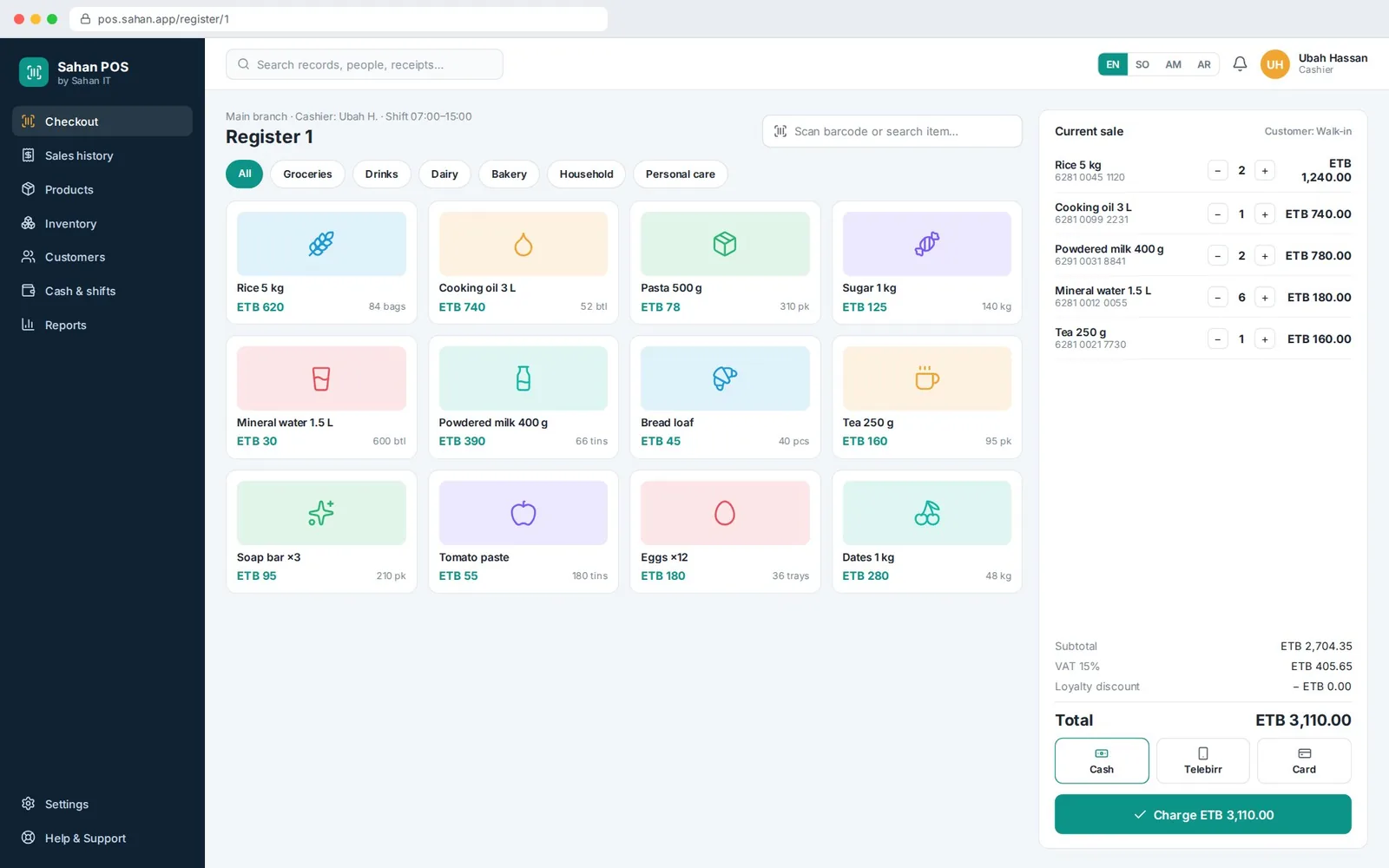
POS Systems: Checkout screen (sample screen with illustrative data)
Checkout screen · Scan or tap, split payment, print a fiscal receipt.

Sample screen with illustrative data

keeps selling when the internet drops
Offline
receipts via approved fiscal printers
Fiscal
central prices, stock and reports
Multi-branch
Built for
  • Supermarkets and mini-markets
  • Restaurants, cafés and fast food
  • Retail and wholesale shops
  • Chains with several branches
POS · Modules

12 modules, one integrated system

Each module feels familiar, shares data and is supported by the same team.

  1. 01

    Touch checkout

    Barcode, search or touch grid, split payments.

    Shares data with 11 more modules

  2. 02

    Offline mode

    Sales continue offline and sync automatically.

  3. Fiscal receipts

    Integration with approved fiscal printers.

  4. Restaurant mode

    Tables, modifiers, kitchen display and bill split.

  5. Inventory

    Stock by branch, transfers, counts and wastage.

  6. Purchasing

    Supplier orders and goods receipt.

  7. Customers & loyalty

    Points, credit customers and SMS offers.

  8. Promotions

    Happy hour, bundles and price lists.

  9. Cash management

    Shifts, cash-up, float and over/short.

  10. Multi-branch

    Central products, prices and user rights.

  11. Hardware

    Scanners, scales, cash drawers and printers.

  12. Reports

    Sales by item, cashier, hour and branch.

POS · Sample screens

Inside POS

Sample screens with illustrative data, with the key details called out.

POS Systems: Checkout screen (sample screen with illustrative data)

Sample screen with illustrative data

Screen 01 / 02

Checkout screen

Scan or tap, split payment, print a fiscal receipt.

  1. 1Touch grid and barcode scanning
  2. 2Cash, Telebirr and card in one sale
  3. 3Works offline, syncs automatically
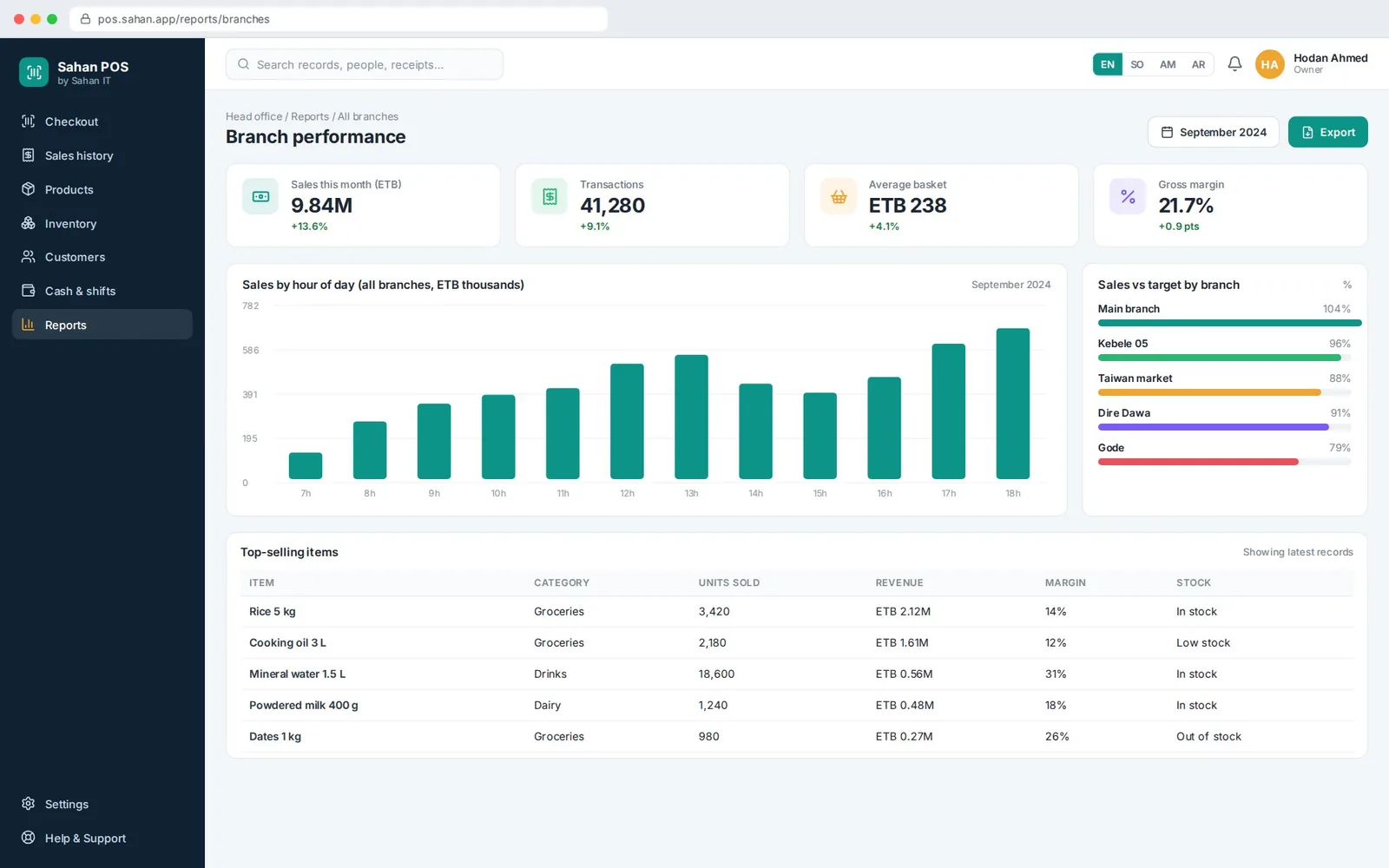
POS Systems: Head-office reports (sample screen with illustrative data)

Sample screen with illustrative data

Screen 02 / 02

Head-office reports

Sales by hour, branch performance and top sellers.

  1. 1Peak-hour staffing insight
  2. 2Branch sales vs target
  3. 3Margin and stock on top sellers
  4. 4Cashier over/short reports
  5. 5Export to accounting
POS · How it works

From first request to final report

  1. 01

    Set up

    Products, prices and branches

  2. 02

    Sell

    Fast checkout online or offline

  3. 03

    Stock

    Inventory updated on every sale

  4. 04

    Close

    Shift cash-up and fiscal Z-report

  5. 05

    Analyse

    Branch and item performance

Results for our clients

Result 01

Faster queues at the till

Result 02

No stock or cash leakage

Result 03

Owner visibility from anywhere

Built on one platform

Every Sahan system is built on one platform

So each new module you add feels familiar, shares data and is supported by the same team.

How the platform fits together
  • Multilingual

    Somali, Amharic, English and Arabic, including right-to-left.

  • Role-based security

    Granular permissions, two-factor login, full audit logs.

  • Web + mobile

    Responsive web plus Flutter apps for Android and iOS.

  • Offline-ready

    Field apps keep working without a connection.

  • Payments & SMS

    Mobile money, bank and SMS notifications built in.

  • Dashboards

    Real-time KPIs and exportable reports everywhere.